Logo
3.0.5

Getting Started

  • Overview
    • License
  • Installation

Examples

  • Loading Images: Quickstart
    • Aperio SVS
    • Generic tiled TIFF
    • Hamamatsu NDPI
    • Hamamatsu VMS
    • Leica SCN
    • MIRAX
    • Olympus VSI
    • Trestle TIFF
    • Ventana BIF
    • Zeiss ZVI
    • DICOM
    • Volumetric + time-series OME-TIFF
    • CODEX spatial proteomics
    • MERFISH spatial gene expression
    • Visium 10x spatial gene expression
    • Vectra Slide
  • Brightfield Imaging: Quickstart
  • Multiparametric Imaging: Quickstart
    • Defining a Multiparametric Pipeline
    • AnnData Integration and Spatial Single Cell Analysis
    • References
  • Multiparametric Imaging: CODEX
    • Reading the slides
    • Define and run the preprocessing pipeline
    • Extract and concatenate the resulting count matrices
    • Annotate the clusters based on the markers intensity
    • Identification of cellular neighborhoods
  • Preprocessing: Transforms Gallery

    • Transforms that modify an image
      • Blurring Transforms
      • Superpixel Interpolation
      • Stain Normalization
    • Transforms that create a mask
      • Binary Threshold
      • Nucleus Detection
    • Transforms that modify a mask
      • Morphological Opening
      • Morphological Closing
      • Foreground Detection
      • Tissue Detection
  • Preprocessing: H&E Stain Normalization
    • Data
      • Stain normalization
      • Stain Deconvolution
      • References
  • Preprocessing: Graph construction
    • Data
    • Nucleus Detection
    • Feature Extraction
    • Cell-graph Construction
    • Tissue detection and feature extraction
    • Tissue-graph Construction
    • (Optional) Creating an assignment matrix
    • Putting it all together
    • References
  • Preprocessing: Tile Stitching
    • Prerequisites
      • Software Installation
      • Environment Configuration
    • Best Practices and Considerations for Using the TileStitcher Module
      • 1. JVM Session Management
      • 2. Restarting Kernel to Re-initialize JVM
      • 3. Segregating Workflows
      • Using TileStitcher
        • Initialization
        • JVM Startup
      • Image Stitching with TileStitcher
      • Demo
  • Machine Learning: Training a HoVer-Net model
    • Data augmentation
    • Load PanNuke dataset
    • Model Training
      • Training with multi-GPU
      • Main training loop
    • Evaluate Model
    • Examples
    • Conclusion
    • References
    • Session info
  • Machine Learning: Training a HACTNet model
    • Data visualization
    • Model Training
    • Model evaluation
    • References
    • Session info
  • Inference API: Tutorial using ONNX
    • Introduction
    • Quick Sample Code
    • Load Packages
    • ONNX Inference Class and ONNX Model Fixer
      • Functions to remove initializers and check that initializers have been removed.
      • Inference Classes
    • Try it Yourself!
      • Converting a Pytorch Model to ONNX Using the convert_pytorch_onnx Function
      • Local ONNX Model Using the Inference Class
      • Local ONNX Model Using the HaloAIInference Class
      • Remote ONNX Using our RemoteTestHoverNet Class
    • Iterate over the tiles
    • Full Example With Vizualization of Output
      • Run Code as Demonstrated Above
    • References
  • Workflow: Analysis of Acquired Resistance to ICI in NSCLC
    • Notebook Outline:
    • Initialization
      • Import Libraries
    • Model initialization and Data Loading
      • Initialize Inference
      • Model Overview
      • Load and Display Example Image
      • SlideData and Tile Initialization
      • Apply Inference to Tile
      • Plotting the Segmented Cells
    • Model Inference and Detection of Cell Types
      • HoVer-Net Inference
      • Run Inference Pipeline on Whole Slide Images
      • Saving the Results
    • Graph Construction and Feature Extraction
      • Group and Rescale Centroids
      • Graph Construction
      • Extracting Graph Features
    • Conclusion and Further Steps
      • Modeling and Statistical Testing
      • Extending Analysis with Advanced Graph Techniques
      • References
  • Talk to PathML
    • A digital pathology assistant for democratizing access to advanced computational image analysis
      • Example 1: Installing PathML on MacOS
      • Example 2: Information about supported file types
      • Example 3: MIF pipelines
      • Example 4: Nucleus Detection
      • Example 5: Graph API
      • Example 6: Inference API

Preprocessing

  • Loading Images
    • Individual Images
    • Datasets of Images
    • Supported slide types
    • Supported file formats
  • Creating Preprocessing Pipelines
    • What is a Transform?
    • What is a Pipeline?
    • Creating custom Transforms
  • Running Preprocessing Pipelines
    • How it works
    • Preprocessing a single WSI
    • Preprocessing a dataset of WSI
    • Distributed processing
  • HDF5 Integration
    • Overview
    • How it Works
    • About HDF5
    • .h5path File Format
    • Reading and Writing

Datasets

  • Datasets
    • DataModules
    • Using public datasets
    • References

Graphs

  • Graphs

Machine Learning

  • DataLoaders
  • Models
    • References

Inference

  • Inference

API Reference

  • Core API
    • SlideData
      • SlideData
        • SlideData.counts
        • SlideData.extract_region()
        • SlideData.generate_tiles()
        • SlideData.plot()
        • SlideData.run()
        • SlideData.shape
        • SlideData.write()
      • Convenience SlideData Classes
        • HESlide
        • VectraSlide
        • MultiparametricSlide
        • CODEXSlide
    • Slide Types
      • SlideType
        • SlideType.asdict()
    • Tile
      • Tile
        • Tile.plot()
        • Tile.shape
    • SlideDataset
      • SlideDataset
        • SlideDataset.run()
        • SlideDataset.write()
    • Tiles and Masks helper classes
      • Tiles
        • Tiles.add()
        • Tiles.keys
        • Tiles.remove()
        • Tiles.tile_shape
        • Tiles.update()
      • Masks
        • Masks.add()
        • Masks.keys
        • Masks.remove()
        • Masks.slice()
    • Slide Backends
      • OpenslideBackend
        • OpenSlideBackend
      • BioFormatsBackend
        • BioFormatsBackend
      • DICOMBackend
        • DICOMBackend
    • h5pathManager
      • h5pathManager
        • h5pathManager.add_mask()
        • h5pathManager.add_tile()
        • h5pathManager.get_mask()
        • h5pathManager.get_slidetype()
        • h5pathManager.get_tile()
        • h5pathManager.remove_mask()
        • h5pathManager.remove_tile()
        • h5pathManager.slice_masks()
        • h5pathManager.update_mask()
  • Preprocessing API
    • Pipeline
      • Pipeline
        • Pipeline.apply()
        • Pipeline.save()
    • Transforms
      • MedianBlur
        • MedianBlur.F()
        • MedianBlur.apply()
      • GaussianBlur
        • GaussianBlur.F()
        • GaussianBlur.apply()
      • BoxBlur
        • BoxBlur.F()
        • BoxBlur.apply()
      • BinaryThreshold
        • BinaryThreshold.F()
        • BinaryThreshold.apply()
      • MorphOpen
        • MorphOpen.F()
        • MorphOpen.apply()
      • MorphClose
        • MorphClose.F()
        • MorphClose.apply()
      • ForegroundDetection
        • ForegroundDetection.F()
        • ForegroundDetection.apply()
      • SuperpixelInterpolation
        • SuperpixelInterpolation.F()
        • SuperpixelInterpolation.apply()
      • StainNormalizationHE
        • StainNormalizationHE.F()
        • StainNormalizationHE.apply()
        • StainNormalizationHE.fit_to_reference()
      • NucleusDetectionHE
        • NucleusDetectionHE.F()
        • NucleusDetectionHE.apply()
      • TissueDetectionHE
        • TissueDetectionHE.F()
        • TissueDetectionHE.apply()
      • LabelArtifactTileHE
        • LabelArtifactTileHE.F()
        • LabelArtifactTileHE.apply()
      • LabelWhiteSpaceHE
        • LabelWhiteSpaceHE.F()
        • LabelWhiteSpaceHE.apply()
      • SegmentMIF
        • SegmentMIF.F()
        • SegmentMIF.apply()
      • SegmentMIFRemote
        • SegmentMIFRemote.F()
        • SegmentMIFRemote.apply()
      • QuantifyMIF
        • QuantifyMIF.F()
        • QuantifyMIF.apply()
      • CollapseRunsVectra
        • CollapseRunsVectra.F()
        • CollapseRunsVectra.apply()
      • CollapseRunsCODEX
        • CollapseRunsCODEX.F()
        • CollapseRunsCODEX.apply()
      • RescaleIntensity
        • RescaleIntensity.F()
        • RescaleIntensity.apply()
      • HistogramEqualization
        • HistogramEqualization.F()
        • HistogramEqualization.apply()
      • AdaptiveHistogramEqualization
        • AdaptiveHistogramEqualization.F()
        • AdaptiveHistogramEqualization.apply()
    • TileStitching
      • TileStitcher
        • TileStitcher.checkTIFF()
        • TileStitcher.format_jvm_options()
        • TileStitcher.is_bfconvert_available()
        • TileStitcher.parseRegion()
        • TileStitcher.parse_regions()
        • TileStitcher.run_bfconvert()
        • TileStitcher.run_image_stitching()
        • TileStitcher.setup_bfconvert()
        • TileStitcher.shutdown()
        • TileStitcher.toShort()
  • Graph API
    • Graph Building
      • BaseGraphBuilder
        • BaseGraphBuilder.process()
        • BaseGraphBuilder.process_with_centroids()
      • KNNGraphBuilder
      • RAGGraphBuilder
      • MSTGraphBuilder
    • Tissue Extraction
      • SuperpixelExtractor
        • SuperpixelExtractor.process()
      • SLICSuperpixelExtractor
      • MergedSuperpixelExtractor
        • MergedSuperpixelExtractor.process()
      • ColorMergedSuperpixelExtractor
    • Graph Feature Extraction
      • GraphFeatureExtractor
        • GraphFeatureExtractor.get_stats()
        • GraphFeatureExtractor.process()
  • Datasets API
    • Downloadable Datasets
      • PanNukeDataModule
        • PanNukeDataModule.test_dataloader
        • PanNukeDataModule.train_dataloader
        • PanNukeDataModule.valid_dataloader
      • DeepFocusDataModule
        • DeepFocusDataModule.test_dataloader
        • DeepFocusDataModule.train_dataloader
        • DeepFocusDataModule.valid_dataloader
    • ML Dataset classes
      • TileDataset
      • EntityDataset
  • ML API
    • Models
      • HoVerNet
        • HoVerNet.forward()
      • HACTNet
        • HACTNet.forward()
    • Layers
      • GNNLayer
        • GNNLayer.forward()
      • Helper functions
        • compute_hv_map()
        • loss_hovernet()
        • remove_small_objs()
        • post_process_batch_hovernet()
  • Utilities API
    • Logging Utils
      • PathMLLogger
        • PathMLLogger.disable()
        • PathMLLogger.enable()
    • Core Utils
      • readtupleh5()
      • writedataframeh5()
      • writedicth5()
      • writestringh5()
      • writetupleh5()
      • readcounts()
      • writecounts()
    • Graph Utils
      • Graph()
      • HACTPairData()
      • get_full_instance_map()
      • build_assignment_matrix()
      • two_hop()
      • two_hop_no_sparse()
    • Datasets Utils
      • DeepPatchFeatureExtractor
        • DeepPatchFeatureExtractor.process()
      • pannuke_multiclass_mask_to_nucleus_mask()
      • _remove_modules()
    • ML Utils
      • center_crop_im_batch()
      • dice_loss()
      • dice_score()
      • get_sobel_kernels()
      • wrap_transform_multichannel()
      • scatter_sum()
      • broadcast()
      • get_degree_histogram()
      • get_class_weights()
    • Miscellaneous Utils
      • upsample_array()
      • pil_to_rgb()
      • segmentation_lines()
      • plot_mask()
      • contour_centroid()
      • sort_points_clockwise()
      • pad_or_crop()
      • RGB_to_HSI()
      • RGB_to_OD()
      • RGB_to_HSV()
      • RGB_to_LAB()
      • RGB_to_GREY()
      • normalize_matrix_rows()
      • normalize_matrix_cols()
      • plot_segmentation()
  • Inference API
    • Base Inference Class
      • InferenceBase
        • InferenceBase.F()
        • InferenceBase.apply()
        • InferenceBase.get_model_card()
        • InferenceBase.reshape()
        • InferenceBase.set_citation()
        • InferenceBase.set_model_input_notes()
        • InferenceBase.set_model_output_notes()
        • InferenceBase.set_model_type()
        • InferenceBase.set_name()
        • InferenceBase.set_notes()
        • InferenceBase.set_num_classes()
    • Inference Class
      • Inference
        • Inference.F()
        • Inference.apply()
        • Inference.inference()
    • HaloAI Inference Class
      • HaloAIInference
        • HaloAIInference.F()
        • HaloAIInference.apply()
    • RemoteTestHoverNet Class
      • RemoteTestHoverNet
        • RemoteTestHoverNet.apply()
        • RemoteTestHoverNet.remove()
    • RemoteMesmer Class
      • RemoteMesmer
        • RemoteMesmer.F()
        • RemoteMesmer.apply()
        • RemoteMesmer.inference()
        • RemoteMesmer.remove()
      • Helper functions
        • remove_initializer_from_input()
        • check_onnx_clean()
        • convert_pytorch_onnx()

Contributing

  • Contributing
    • Submitting a bug report
    • Requesting a new feature
    • For developers
      • Coordinate system conventions
      • Setting up a local development environment
      • Running tests
      • Building documentation locally
      • Checking code coverage
      • How to contribute code, documentation, etc.
      • Versioning and Distributing
      • Code Quality
      • Documentation Standards
      • Testing Standards
    • Thank You!
PathML
  • Preprocessing: Transforms Gallery
  • View PathML on GitHub
Previous Next

Preprocessing: Transforms Gallery

View on GitHub

In PathML, preprocessing pipelines are created by composing modular Transforms.

The following tutorial contains an overview of the PathML pre-processing Transforms, with examples.

We will divide Transforms into three primary categories, depending on their function:

  1. Transforms that modify an image

    • Gaussian Blur

    • Median Blur

    • Box Blur

    • Stain Normalization

    • Superpixel Interpolation

  2. Transforms that create a mask

    • Nucleus Detection

    • Binary Threshold

  3. Transforms that modify a mask

    • Morphological Closing

    • Morphological Opening

    • Foreground Detection

    • Tissue Detection

[1]:
import matplotlib.pyplot as plt
import copy
import numpy as np

import os

os.environ["JAVA_HOME"] = "/opt/conda/envs/pathml/"

from pathml.core import HESlide, Tile, types
from pathml.utils import plot_mask, RGB_to_GREY
from pathml.preprocessing import (
    BoxBlur,
    GaussianBlur,
    MedianBlur,
    NucleusDetectionHE,
    StainNormalizationHE,
    SuperpixelInterpolation,
    ForegroundDetection,
    TissueDetectionHE,
    BinaryThreshold,
    MorphClose,
    MorphOpen,
)

fontsize = 14

Note that a Transform operates on Tile objects. We must first load a whole-slide image, extract a smaller region, and create a Tile:

[2]:
wsi = HESlide("./../data/CMU-1-Small-Region.svs.tiff")
region = wsi.slide.extract_region(location=(900, 800), size=(500, 500))


def smalltile():
    # convenience function to create a new tile
    tile = Tile(region, coords=(0, 0), name="testregion", slide_type=types.HE)
    tile.image = np.squeeze(tile.image)
    return tile

Transforms that modify an image

Blurring Transforms

We’ll start with the 3 blurring transforms: GaussianBlur, MedianBlur, and BoxBlur

Blurriness can be control with the kernel_size parameter. A larger kernel width yields a more blurred result for all blurring transforms:

[3]:
blurs = ["Original Image", GaussianBlur, MedianBlur, BoxBlur]
blur_name = ["Original Image", "GaussianBlur", "MedianBlur", "BoxBlur"]
k_size = [5, 11, 21]
fig, axarr = plt.subplots(nrows=4, ncols=3, figsize=(7.5, 10))
for i, blur in enumerate(blurs):
    for j, kernel_size in enumerate(k_size):
        tile = smalltile()
        if blur != "Original Image":
            b = blur(kernel_size=kernel_size)
            b.apply(tile)
        ax = axarr[i, j]
        ax.imshow(tile.image)
        if i == 0:
            ax.set_title(f"Kernel_size = {kernel_size}", fontsize=fontsize)
        if j == 0:
            ax.set_ylabel(blur_name[i], fontsize=fontsize)
for a in axarr.ravel():
    a.set_xticks([])
    a.set_yticks([])
plt.tight_layout()
plt.show()
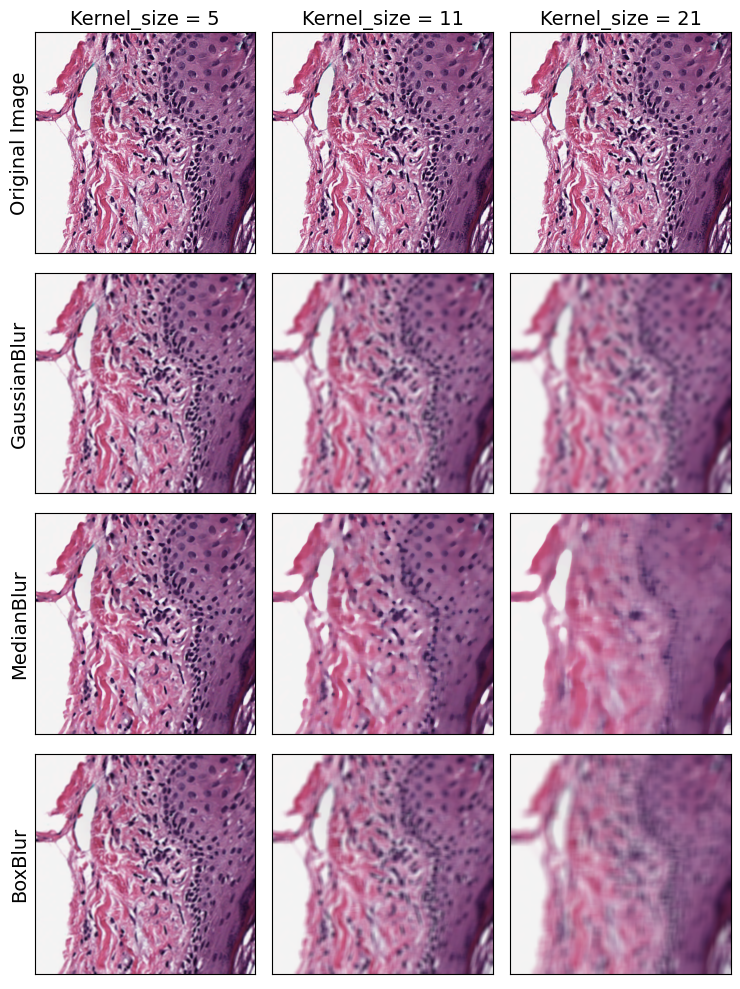
../_images/examples_link_gallery_5_0.png

Superpixel Interpolation

Superpixel interpolation is a method for grouping together nearby similar pixels to form larger “superpixels.” The SuperpixelInterpolation Transform divides the input image into superpixels using SLIC algorithm, then interpolates each superpixel with average color. The region_size parameter controls how big the superpixels are:

[4]:
region_sizes = ["original", 10, 20, 30]
fig, axarr = plt.subplots(nrows=1, ncols=4, figsize=(10, 10))
for i, region_size in enumerate(region_sizes):
    tile = smalltile()
    if region_size == "original":
        axarr[i].set_title("Original Image", fontsize=fontsize)
    else:
        t = SuperpixelInterpolation(region_size=region_size)
        t.apply(tile)
        axarr[i].set_title(f"Region Size = {region_size}", fontsize=fontsize)
    axarr[i].imshow(tile.image)
for ax in axarr.ravel():
    ax.set_yticks([])
    ax.set_xticks([])
plt.tight_layout()
plt.show()
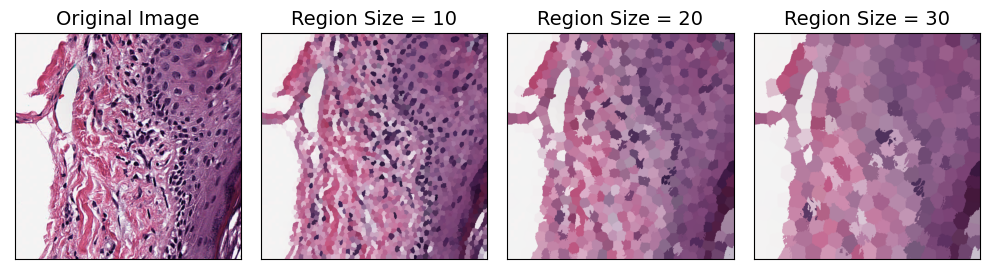
../_images/examples_link_gallery_7_0.png

Stain Normalization

H&E images are a combination of two stains: hematoxylin and eosin. Stain deconvolution methods attempt to estimate the relative contribution of each stain for each pixel. Each stain can then be pulled out into a separate image, and the deconvolved images can then be recombined to normalize the appearance of the image.

The StainNormalizationHE Transform implements two algorithms for stain deconvolution.

[5]:
fig, axarr = plt.subplots(nrows=2, ncols=3, figsize=(10, 7.5))
fontsize = 18
for i, method in enumerate(["macenko", "vahadane"]):
    for j, target in enumerate(["normalize", "hematoxylin", "eosin"]):
        tile = smalltile()
        normalizer = StainNormalizationHE(target=target, stain_estimation_method=method)
        normalizer.apply(tile)
        ax = axarr[i, j]
        ax.imshow(tile.image)
        if j == 0:
            ax.set_ylabel(f"{method} method", fontsize=fontsize)
        if i == 0:
            ax.set_title(target, fontsize=fontsize)
for a in axarr.ravel():
    a.set_xticks([])
    a.set_yticks([])
plt.tight_layout()
plt.show()
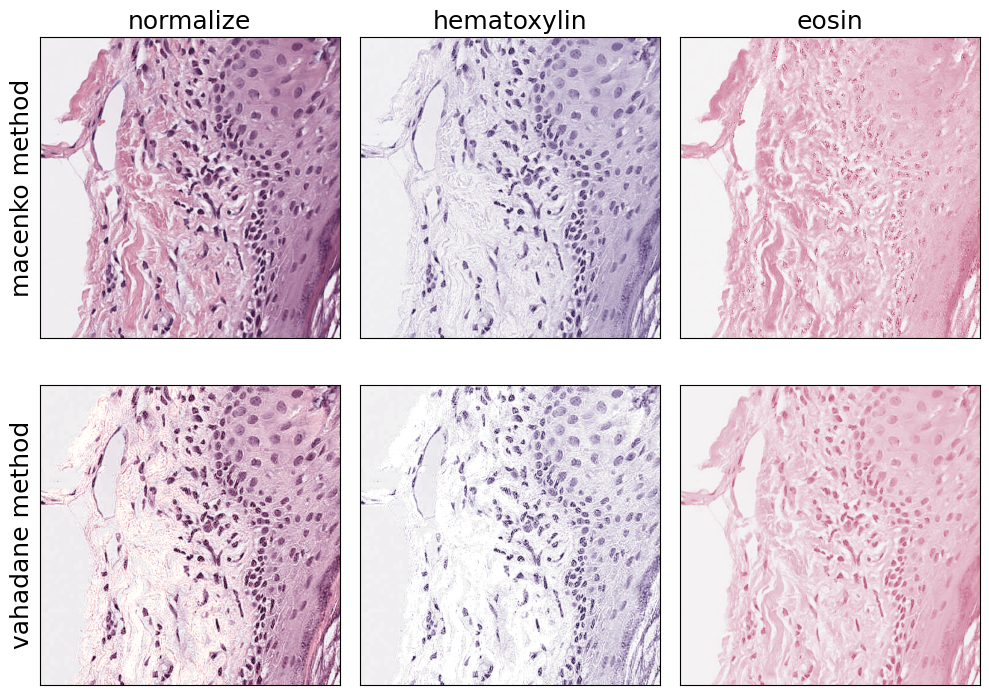
../_images/examples_link_gallery_9_0.png

Transforms that create a mask

Binary Threshold

The BinaryThreshold transform creates a mask by classifying whether each pixel is above or below the given threshold. Note that you can supply a threshold parameter, or use Otsu’s method to automatically determine a threshold:

[6]:
thresholds = ["original", 50, 180, "otsu"]
fig, axarr = plt.subplots(nrows=1, ncols=len(thresholds), figsize=(12, 6))
for i, thresh in enumerate(thresholds):
    tile = smalltile()
    if thresh == "original":
        axarr[i].set_title("Original Image", fontsize=fontsize)
        axarr[i].imshow(tile.image)
    elif thresh == "otsu":
        t = BinaryThreshold(mask_name="binary_threshold", inverse=True, use_otsu=True)
        t.apply(tile)
        axarr[i].set_title(f"Otsu Threshold", fontsize=fontsize)
        axarr[i].imshow(tile.masks["binary_threshold"])
    else:
        t = BinaryThreshold(
            mask_name="binary_threshold", threshold=thresh, inverse=True, use_otsu=False
        )
        t.apply(tile)
        axarr[i].set_title(f"Threshold = {thresh}", fontsize=fontsize)
        axarr[i].imshow(tile.masks["binary_threshold"])
for ax in axarr.ravel():
    ax.set_yticks([])
    ax.set_xticks([])
plt.tight_layout()
plt.show()
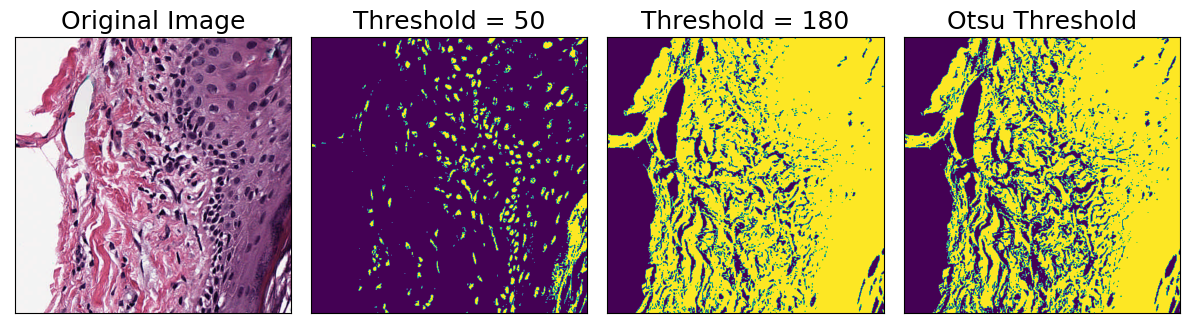
../_images/examples_link_gallery_11_0.png

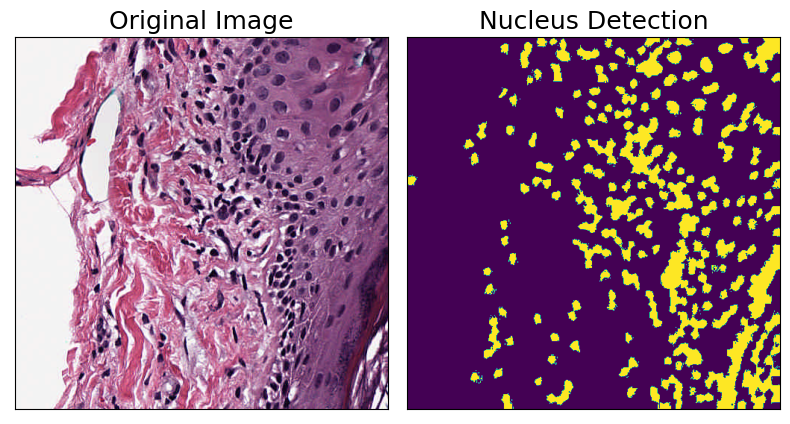
Nucleus Detection

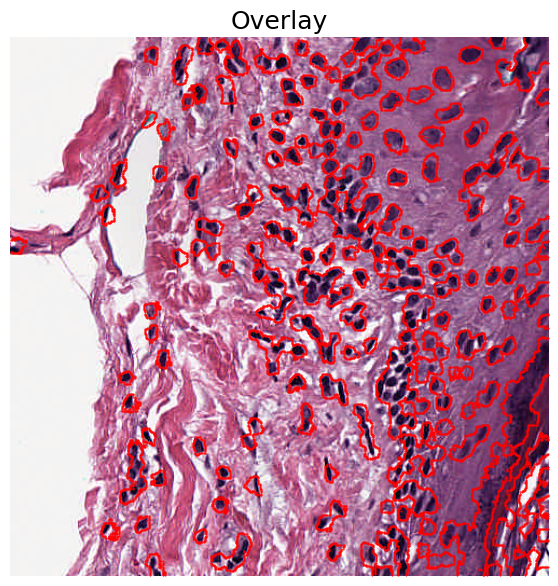
The NucleusDetectionHE transform employs a simple nucleus detection algorithm for H&E stained images. It works by first separating hematoxylin channel, then doing interpolation using superpixels, and finally using Otsu’s method for binary thresholding. This is an example of a compound Transform created by combining several other Transforms:

[7]:
tile = smalltile()
nucleus_detection = NucleusDetectionHE(mask_name="detect_nuclei")
nucleus_detection.apply(tile)

fig, axarr = plt.subplots(nrows=1, ncols=2, figsize=(8, 8))
axarr[0].imshow(tile.image)
axarr[0].set_title("Original Image", fontsize=fontsize)
axarr[1].imshow(tile.masks["detect_nuclei"])
axarr[1].set_title("Nucleus Detection", fontsize=fontsize)
for ax in axarr.ravel():
    ax.set_yticks([])
    ax.set_xticks([])
plt.tight_layout()
plt.show()
../_images/examples_link_gallery_13_0.png

We can also overlay the results on the original image to see which regions were identified as being nuclei:

[8]:
fig, ax = plt.subplots(figsize=(7, 7))
plot_mask(im=tile.image, mask_in=tile.masks["detect_nuclei"], ax=ax)
plt.title("Overlay", fontsize=fontsize)
plt.axis("off")
plt.show()
../_images/examples_link_gallery_15_0.png

Transforms that modify a mask

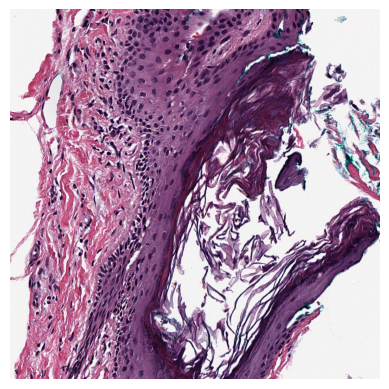
For the following transforms, we’ll use a Tile containing a larger region extracted from the slide.

[11]:
bigregion = wsi.slide.extract_region(location=(800, 800), size=(1000, 1000))
bigregion = np.squeeze(bigregion)


def bigtile():
    # convenience function to create a new tile with a binary mask
    bigtile = Tile(bigregion, coords=(0, 0), name="testregion", slide_type=types.HE)
    BinaryThreshold(
        mask_name="binary_threshold", inverse=True, threshold=100, use_otsu=False
    ).apply(bigtile)
    return bigtile


plt.imshow(bigregion)
plt.axis("off")
plt.show()
../_images/examples_link_gallery_17_0.png

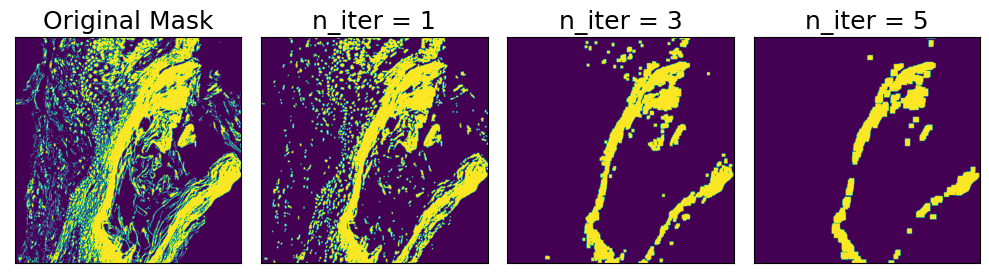
Morphological Opening

Morphological opening reduces noise in a binary mask by first applying binary erosion n times, and then applying binary dilation n times. The effect is to remove small objects from the background. The strength of the effect can be controlled by setting n

[12]:
ns = ["Original Mask", 1, 3, 5]
fig, axarr = plt.subplots(nrows=1, ncols=4, figsize=(10, 10))
for i, n in enumerate(ns):
    tile = bigtile()
    if n == "Original Mask":
        axarr[i].set_title("Original Mask", fontsize=fontsize)
    else:
        t = MorphOpen(mask_name="binary_threshold", n_iterations=n)
        t.apply(tile)
        axarr[i].set_title(f"n_iter = {n}", fontsize=fontsize)
    axarr[i].imshow(tile.masks["binary_threshold"])
for ax in axarr.ravel():
    ax.set_yticks([])
    ax.set_xticks([])
plt.tight_layout()
plt.show()
../_images/examples_link_gallery_19_0.png

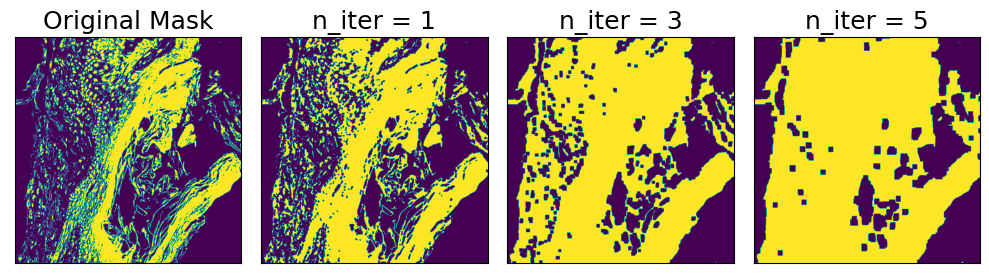
Morphological Closing

Morphological closing is similar to opening, but in the opposite order: first, binary dilation is applied n times, then binary erosion is applied n times. The effect is to reduce noise in a binary mask by closing small holes in the foreground. The strength of the effect can be controlled by setting n

[13]:
ns = ["Original Mask", 1, 3, 5]
fig, axarr = plt.subplots(nrows=1, ncols=4, figsize=(10, 10))
for i, n in enumerate(ns):
    tile = bigtile()
    if n == "Original Mask":
        axarr[i].set_title("Original Mask", fontsize=fontsize)
    else:
        t = MorphClose(mask_name="binary_threshold", n_iterations=n)
        t.apply(tile)
        axarr[i].set_title(f"n_iter = {n}", fontsize=fontsize)
    axarr[i].imshow(tile.masks["binary_threshold"])
for ax in axarr.ravel():
    ax.set_yticks([])
    ax.set_xticks([])
plt.tight_layout()
plt.show()
../_images/examples_link_gallery_21_0.png

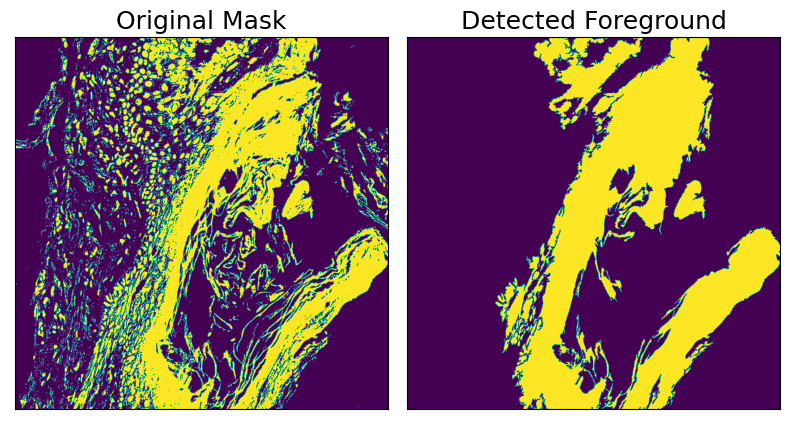
Foreground Detection

This transform operates on binary masks and identifies regions that have a total area greater than specified threshold. Supports including holes within foreground regions, or excluding holes above a specified area threshold.

[14]:
tile = bigtile()
foreground_detector = ForegroundDetection(mask_name="binary_threshold")
original_mask = tile.masks["binary_threshold"].copy()
foreground_detector.apply(tile)

fig, axarr = plt.subplots(nrows=1, ncols=2, figsize=(8, 8))
axarr[0].imshow(original_mask)
axarr[0].set_title("Original Mask", fontsize=fontsize)
axarr[1].imshow(tile.masks["binary_threshold"])
axarr[1].set_title("Detected Foreground", fontsize=fontsize)
for ax in axarr.ravel():
    ax.set_yticks([])
    ax.set_xticks([])
plt.tight_layout()
plt.show()
../_images/examples_link_gallery_23_0.png

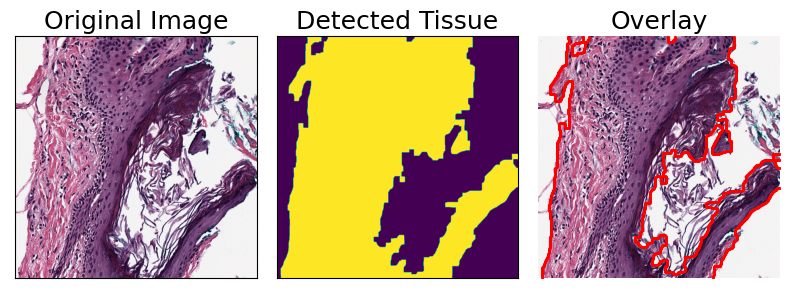
Tissue Detection

TissueDetectionHE is a Transform for detecting regions of tissue from an H&E image. It is composed by applying a sequence of other Transforms: first a median blur, then binary thresholding, then morphological opening and closing, and finally foreground detection.

[15]:
tile = bigtile()

tissue_detector = TissueDetectionHE(mask_name="tissue", outer_contours_only=True)
tissue_detector.apply(tile)

fig, axarr = plt.subplots(nrows=1, ncols=3, figsize=(8, 8))
axarr[0].imshow(tile.image)
axarr[0].set_title("Original Image", fontsize=fontsize)
axarr[1].imshow(tile.masks["tissue"])
axarr[1].set_title("Detected Tissue", fontsize=fontsize)
plot_mask(im=tile.image, mask_in=tile.masks["tissue"], ax=axarr[2])
axarr[2].set_title("Overlay", fontsize=fontsize)

for ax in axarr.ravel():
    ax.set_yticks([])
    ax.set_xticks([])
plt.tight_layout()
plt.show()
../_images/examples_link_gallery_25_0.png
Previous Next

© Copyright 2026, Dana-Farber Cancer Institute and Weill Cornell Medicine.